ChatGPT and Claude prompts for Facebook ads that use your own numbers
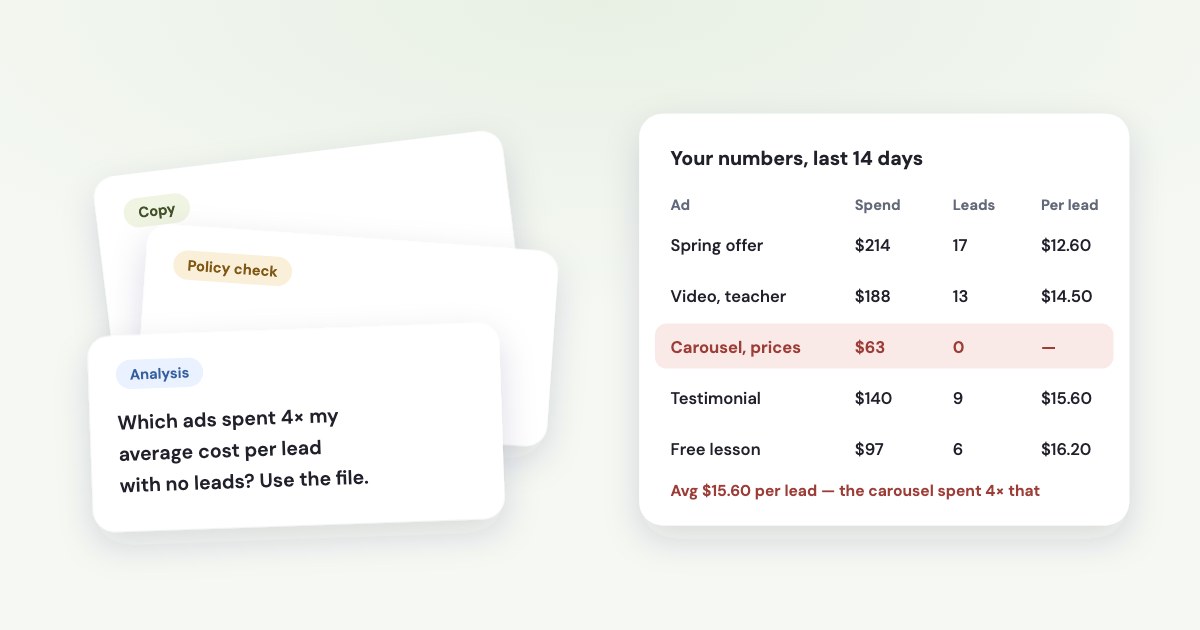
The prompts that pay off start from your own numbers. Export the last 14–30 days by ad from Ads Manager, or connect the ad account, then ask the assistant to find ads that spent the price of 4 leads without one, to explain what moved your cost per lead, and to write new copy in the voice of the ads that brought customers. Prompts that only describe your product give generic copy, and two popular ones — pausing ads with expensive leads and replacing creatives whose CTR fell — lost money when we tested them on one advertiser’s history.
On this page9 sections
First, give it your numbers
An assistant that sees only “we’re a dental clinic in Kraków” can write an ad, but it can’t tell you which ad to stop or why leads got dearer. Two ways to give it the facts:
- A file. In Ads Manager, click Reports → Export table data and choose CSV or Excel (source) — at ad level, for the last 14–30 days. Keep these columns: campaign, ad set and ad name, amount spent, results, cost per result, impressions, link clicks, CTR (link click-through rate), CPM and frequency. If leads go to a CRM, export them too, with the ad each one came from.
- A connected ad account. A connector lets ChatGPT or Claude read the ad account directly, so the numbers are always current — see ChatGPT or Claude.
Start every analysis prompt with three facts the export doesn’t contain: what counts as a result (a lead, a booking, a sale), roughly what one is worth to you, and the date range.
Analysis prompts
1. Ads that spend without results
Attached is my Meta Ads export by ad for the last 14 days. Our result is a lead.
1. Compute the account's cost per lead as total spend / total leads.
2. For each ad that is still active, compute how many leads it should have brought at that cost (its spend / account cost per lead).
3. List the ads with 4 or more expected leads and zero actual leads: name, spend, expected leads.
Do not suggest pausing ads only because their leads are expensive. Show the rows you used.
Why 4: with fewer expected leads, a zero is often bad luck. In the history of one online education business we work with, an ordinary ad got zero leads in 1.8% of two-week windows when 4 were expected, against 13.5% when two were expected. Of the ads in this state that kept running, nine in ten brought no sale in the next four weeks.
2. Why cost per lead changed
Here are two exports by ad set: the last 7 days and the 7 days before. Our result is a lead.
Split the change in cost per lead into three parts: cost per 1,000 impressions (CPM), link click-through rate, and the share of link clicks that became leads.
Tell me which part moved most and in which ad sets.
Then say how many leads each week had, and whether that is enough to treat the change as real rather than noise.
Our guide to rising cost per lead explains what to do with each of the three answers.
3. Lead quality by ad
Attached are my Meta export by ad and a CRM export of leads with the ad they came from (UTM content or ad name) and the stage each lead reached.
Ignore leads younger than 7 days.
For every ad with at least 10 older leads: leads, leads that qualified, share qualified, cost per qualified lead.
Flag ads whose share qualified is below 40% of their campaign's average.
Also flag ads whose leads cost 1.5× the average or more but qualify at least as often — those should stay on.
The thresholds are the ones we use in Variafy’s daily advice; on the same history, flagging sooner — with fewer leads or a smaller gap — paused ads that later turned out to be winners. If several ads share one name, match by ad ID in the link’s UTM tag instead — see matching CRM sales to ads and lead quality.
4. Did the budget raise work?
Ad set "Spring offer": daily budget raised from $30 to $45 on [date]. Attached: its daily spend and leads for the four weeks before and the week after.
1. Compare the week before the raise with the average of the four weeks before it: was it unusually cheap?
2. Compute the cost of the extra leads: (spend after − spend before) / (leads after − leads before).
3. Compare that with what a lead is worth to us: [value].
Step 1 matters more than it looks: raising after an unusually cheap week makes the next week look worse whatever you do — see how to increase a budget.
Copy prompts that start from what worked
“Write a catchy Facebook ad for my clinic” gives the same copy everyone gets. Give the assistant your best ads instead, the text of the page the ad leads to, and Meta’s limits.
5. New copy in the voice of your best ads
Below are the texts of my 5 ads with the most qualified leads over the last 90 days, with their numbers, and the 5 with the fewest.
Below them is the text of the landing page.
1. Describe what the best ones have in common: the offer, the first line, the proof, the call to action.
2. Write 5 primary texts (up to 125 characters), 5 headlines (up to 40) and 3 descriptions (up to 25) in that voice.
   Every headline must work with every primary text: Meta mixes them.
3. Use only facts from the landing page. No discounts, deadlines, guarantees or numbers that aren't there.
4. Don't say or imply anything about the reader's health, finances, age or other personal traits ("Are you…", "your debt…").
The numbers in step 2 are Meta’s recommendations, and text in ads may be further truncated across various placements and devices.
(source) The mixing in step 2 is real too: with several options, text may appear with any other text you’ve provided.
(source) Step 3 is a rule, not taste: products in the ad must match those on the landing page
(source).
6. A policy check before you publish
Check these ad texts against Meta's Advertising Standards.
Flag any phrase that asserts or implies the reader's personal attributes (health, medical conditions, financial status, age, religion and so on),
promises a health or weight result within a set time, guarantees a job or a salary, or promises unrealistic income.
For each flag: quote the phrase, name the rule, and suggest a rewrite that keeps the meaning.
The personal-attributes rule is where AI copy trips most, because “Struggling with…?” is the default hook of every copy model. Meta’s own examples (source):
| Rejected | Allowed | |
|---|---|---|
| Health | “Do you have diabetes?” | “New diabetes treatment available” |
| Mental health | “Depression getting you down? Get help now.” | “Depression counseling” |
| Finances | “Are you bankrupt? Check out our services.” | “You” and “your” are fine without a personal attribute |
Schools and clinics have two more traps. Health ads can’t promise specific outcomes within a set time frame without disclaimers or qualifiers
(source), and Offers of guaranteed jobs
or jobs with advance promises of salary
are prohibited
(source). The assistant’s check is a first pass, not Meta’s review.
Why not Meta’s own text generator?
Ads Manager can write up to five variations of your primary text and headline from your own text (source).
Two limits matter here. Financial services, health, housing, employment and some countries may not have immediate access to all generative AI features
— exactly the businesses this guide is for. And you won’t see performance details for specific text variations
, so you can’t tell
which one worked. If you need to know, run texts as separate ads.
Meta doesn’t ask you to label copy written with AI. Its “AI info” label is for images and video made or heavily edited with generative tools (source).
Two popular prompts we wouldn’t use
Tested on one advertiser’s history
We back-tested the daily rules behind these prompts on the ads of one online education business we work with, judging each rule by the money its leads later brought, not by Meta’s numbers.
- “Pause every ad whose cost per lead is twice the average.” Those ads went on to return as much revenue for their spend as the rest, and some became the best performers; pausing them lost money in both halves of the year.
- “Replace creatives whose CTR dropped.” A 30–50% fall in click-through rate on a creative older than three weeks didn’t predict how much it would earn next, and brand-new creatives earned less in their first four weeks than the “tired” ones they would have replaced.
Cost per lead and CTR are Meta’s numbers; what you need is how many leads become customers. If your CRM can tell you that, use prompt 3 instead.
ChatGPT or Claude: files, and checking the math
Both read a spreadsheet and calculate with code rather than guessing. The practical differences:
| ChatGPT | Claude | |
|---|---|---|
| File types | XLSX, XLS, CSV, TSV | CSV, XLSX (turn on code execution for XLSX) |
| Size and count | Spreadsheets up to about 50 MB; 3 uploads a day on the free plan | Up to 20 files per chat; plan for 30 MB per file |
| How it calculates | Runs Python and shows the code | Runs code in its analysis environment |
Sources: OpenAI on file uploads and data analysis; Anthropic on
uploads and code execution. Both companies say the model can be confidently wrong.
OpenAI’s advice is to review the generated code, outputs, and assumptions before relying on the result.
What goes wrong in practice, and the line to add to your prompt:
- Averages of averages. “Average cost per lead” must be total spend divided by total leads. “Compute rates from totals, not by averaging the rows.”
- The totals row. If the export has a summary row, it doubles every sum. “Ignore any total or summary row.”
- Screenshots. OpenAI warns it may not read exact values from images; export the table instead.
- Different windows. Two exports with different dates or attribution settings don’t compare. “Tell me the date range and attribution setting of each file.” See our guide to client reports for what Meta estimates.
- One number by hand. Pick one ad and check its figures against Ads Manager before you act on the list.
Two habits for client data: turn off model training in the assistant’s settings, and don’t merge different clients’ accounts into one file — Meta’s rules allow using ad data to assess your own campaigns, not to mix data across advertisers (source).
From a file to a connected ad account
An export is a snapshot: by the time you paste it, it is a day old, and every question needs a new file. A connector lets the assistant read the ad account itself.
- Claude accepts custom connectors on every plan; the free plan allows one (source).
- ChatGPT gives full support for custom MCP servers on Business, Enterprise and Edu; Pro users can connect them with read-only permissions (source).
- Meta runs its own server, and several third-party ones exist — compared in Meta Ads MCP servers.
With a connected account, prompts 1–4 work without a file: “Which ads spent the price of 4 leads without one in the last 14 days?”
How Variafy runs these prompts for you
Variafy connects ChatGPT, Claude and other assistants to your Meta ad accounts, and the analysis prompts above are built into it:
- Every morning it checks each ad account for ads that spent the price of 4 results without one, and sends at most three things to do.
- With your CRM or a Google Sheet connected, it judges ads by qualified leads and sales, and protects ads whose leads cost more but pay — it never suggests pausing an ad on cost per lead alone.
- Ask why cost per lead moved and it splits the change into price, clicks and conversion, with the edits made in the account that week.
- Ask for a change and you get a preview with its effect on spend; nothing runs until you confirm.
Add https://www.variafy.com/mcp to your assistant. Variafy is in private beta:
join the waitlist.
How we checked
Checked on 16 October 2026 against Meta’s Business Help Center (text length, multiple text options, text generation, AI info labels, exporting data), Meta’s Advertising Standards and Community Standards in the Transparency Center (personal attributes, health and wellness, prohibited commercial practices, data use), and the help centres of OpenAI and Anthropic (file uploads, data analysis, connectors). The thresholds in the analysis prompts are the rules behind Variafy’s daily advice, back-tested on the ad and CRM history of one online education business we work with; results are given as proportions, judged by the revenue the leads later brought. We also read nine popular prompt articles from other vendors.
Variafy is our product.
Questions
What are good ChatGPT prompts for Facebook ads?
Prompts that use your own numbers: find ads that spent the price of four leads without one, explain which part of cost per lead moved, rank ads by qualified leads from your CRM, and write new copy in the voice of your best ads with Meta’s length limits and ad rules spelled out.
How long should Facebook ad copy be?
Meta recommends up to 125 characters of primary text, 40 for the headline and 25 for the description, and warns that text can be cut shorter in some placements and on some devices.
Can I use ChatGPT or Claude to analyse my Facebook ads data?
Yes. Export the Ads Manager table as CSV or Excel and upload it; both assistants calculate with code. Ask for rates computed from totals, exclude summary rows, and check one number against Ads Manager. A connector lets the assistant read the ad account directly instead.
Does Meta allow ad copy written by AI?
Yes. Meta doesn’t require a label for AI-written text; its AI info label applies to images and video made or heavily edited with generative tools. The copy still has to follow the Advertising Standards, including the rule against implying personal attributes.
Why was my AI-written Facebook ad rejected?
Most often for implying the reader’s personal attributes, such as “Do you have diabetes?” or “Are you bankrupt?”, or for health promises within a set time, guaranteed jobs or unrealistic income. Ask the assistant to check the text against those rules before publishing.
Should I pause Facebook ads with an expensive cost per lead?
Not on cost per lead alone. In our back-test on one advertiser’s history, ads with leads twice as expensive as average went on to return as much revenue as the rest. Judge by qualified leads or sales from your CRM.
Is ChatGPT or Claude better for Facebook ads?
Both read ad exports and calculate with code. Claude allows a custom connector on every plan, including one on the free plan; ChatGPT gives full support for custom connectors on Business, Enterprise and Edu. Use whichever your team already works in.