Facebook ads audit checklist: a new client’s ad account in 30 minutes
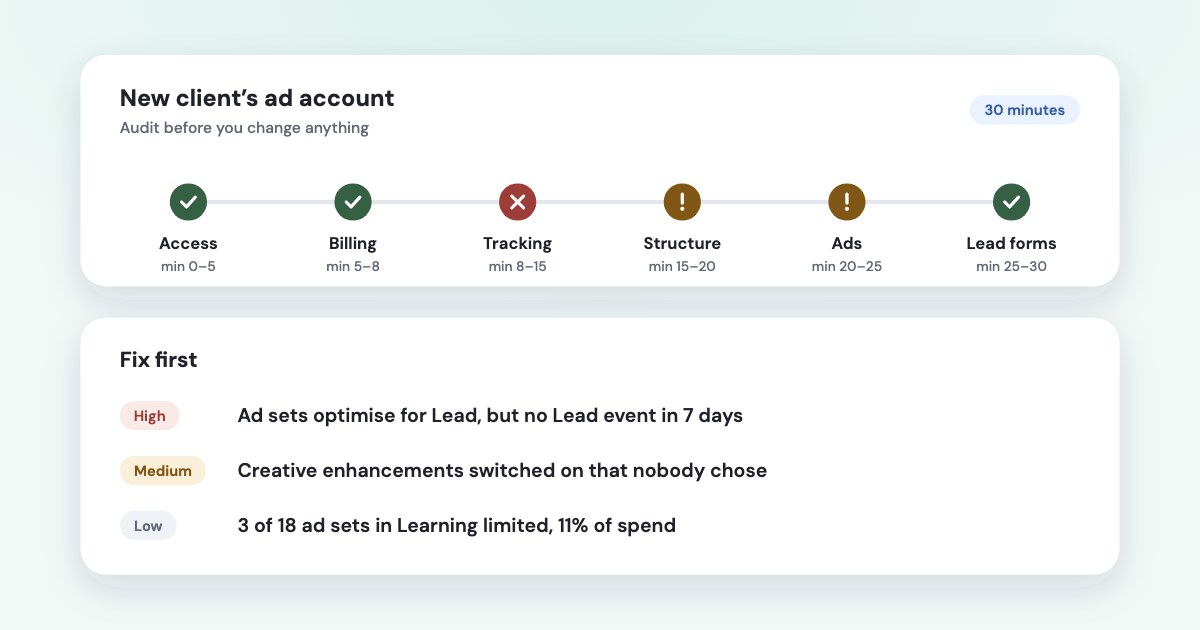
Audit a new client’s Meta ad account in six steps before you change anything: who owns the account and the card, the settings that apply to the whole account, whether tracking records the event the ads optimise for, how the budget is split, which ads spend without results, and where the leads go. Write each finding down with a number, fix the three that cost the most, and give the account a week of data before the next round.
On this page12 sections
Before you start: the right access, and hands off
Ask the client to add your business as a partner to their business portfolio. Don’t take their login, and don’t move their ad account into your portfolio:
Most marketing companies won't need to claim ad accounts from their clients.
For the audit itself, partial access is enough. On an ad account, Meta’s “View performance” task lets you view ads and access reports;
“Manage campaigns” adds creating and editing ads; only full access controls settings, finances and permissions
(source). Ask for the pixel as well — “Use events dataset” lets you see its data. Jon Loomer
runs his paid audits that way — he cannot create, edit, pause, or change anything in your account
and removes his access
within 48 hours of delivering (source).
Then two rules for the next 30 minutes:
- Change nothing. Budget, targeting and creative edits restart learning — see Learning limited — and you lose the clean “before” picture.
- Write down the baseline. Spend, results and cost per result for the last 30 days by campaign, plus the client’s own count of leads and sales from their CRM for the same days.
The plan:
- Minutes 0–5: ownership and access.
- Minutes 5–8: billing and account settings.
- Minutes 8–15: tracking.
- Minutes 15–20: structure and budget.
- Minutes 20–25: ads and the settings that change them.
- Minutes 25–30: lead forms and the CRM.
Minutes 0–5: who owns the account, and who has access
None of the seven audit checklists we compared asks who owns the ad account and the card, yet it is the problem that hurts most later. Open Business settings in the client’s portfolio and compare what you see with this:
| Healthy | Red flag | |
|---|---|---|
| Ad account owner | The client’s business portfolio | A previous agency’s or freelancer’s portfolio |
| Pixel (dataset) and Page | In the same client portfolio | Split: pixel with the agency, Page with the client |
| Payment method | The client’s card, added by the client | An agency’s or a former employee’s card |
| Admins | At least two client employees, with two-factor authentication | One person, or people who left |
| Partners | Only the agencies working on the account now | Agencies that finished months ago |
Why ownership matters: an ad account stays in the portfolio it was created in.
If you create a new ad account in a business portfolio, it will permanently be a part of that portfolio. This means the ad account can't be deleted or transferred from the portfolio.
(source) The pixel is the same: you can’t delete a dataset or transfer it to another business portfolio
(source). A partner’s access, by contrast, can be removed at any time, and a partner can’t pass the
asset on — only the organization that owns the asset can share it with another business portfolio
(source). If a previous agency owns the account, the client should know that before you build on it.
A split setup causes trouble long before anyone leaves. One agency on Shopify Community couldn’t connect the Conversions API because
the ad account and Pixel is owned by my agency and not by the client
, while the client owned the Page
(source).
Two-factor authentication isn’t optional either: If two-factor authentication isn't turned on, Meta may restrict or remove people's access to advertising
(source). Jon Loomer’s account checklist adds: remove users inactive for 90 days and keep at least two
employees with full admin access (source).
Minutes 5–8: billing and account settings
- Payment method. Without one, ads can be created but
these ads will get no delivery
(source). Only someone with full control can change it, which is how it should be for an agency. Check for an account spending limit that someone set and forgot — our guide to spending limits and failed payments covers it. - Time zone and currency. Ads Manager reports days in the account’s time zone, so a CRM in another zone splits days differently.
Changing either one creates a new ad account:
When you change your time zone, this closes the existing ad account and ads created with the closed account will stop running.
(source) Currency can be changed once every 60 days and only with no balance due; for some countries, Poland among them, the business country and currency must match (source). If either is wrong, plan the switch with the client — it means rebuilding the campaigns. - EU beneficiary and payer. If the client advertises in the EU, every ad set needs them: since August 2023
if beneficiary and payer information is not provided, the ad will not be published.
Set defaults at account level so new ad sets get them (source). - Special ad category. In 2026 there are four:
housing, employment, financial products and services, or issues, elections, and politics.
Financial products and services replaced “credit” in January 2025, andAds may be rejected if the advertiser does not choose an appropriate Special Ad Category.
The category narrows targeting — ages generally fixed to 18–65+, all genders, no lookalikes (source). Employment is wider than job ads: it includes ads forinternships or professional certification programs
(source). If the client sells courses that end in a professional certificate, check the category with Meta’s guide. Political ads have not been allowed in the EU since 6 October 2025. - Verification. Meta is widening advertiser verification so that verified advertisers drive 90% of its ad revenue by the end of 2026 (source). If the account shows a verification request, put it at the top of your list.
Minutes 8–15: tracking
The question isn’t “is the pixel installed?” but “does the event the ad sets optimise for actually arrive?” A pixel can fire
page views for months while the Lead event is broken. One Shopify store, after several experts confirmed its pixels were connected,
still saw Meta report 3460 link clicks
in a week while the store showed zero sessions from Facebook
(source).
- List the optimisation events. For each active ad set, note the conversion it optimises for (Lead, Purchase, a custom conversion).
- Check each one fired in the last 7 days in Events Manager, and on the website with Meta Ads Data Advisor (the extension once
called Pixel Helper):
Inactive: Your event is not currently sending data.
(source). - Look for server events. Browser-only tracking loses events to ad blockers and browser privacy settings. If the Conversions API sends the same events, they need a shared event ID to be counted once — see Conversions API for CRM.
- Read event match quality. Meta suggests you
aim for an Event Match Quality score of 6.0 or higher
(source). - Open Diagnostics in Events Manager and note anything active.
For clinics, therapists and financial advisers
Since September 2025 Meta flags custom audiences and custom conversions
suggesting specific health conditions (e.g., “arthritis”, “diabetes”) or financial status
and blocks them from campaigns
(source). Since January 2026, creating or updating a campaign that uses one fails. A published
campaign’s custom conversion can’t be swapped — Meta’s advice is to duplicate the campaign with an unflagged one
(source). Check the names of the client’s custom conversions and audiences.
Two things you no longer need to check: ranking eight events in Aggregated Event Measurement, and verifying the domain for
conversion events. Meta: You no longer need to prioritize 8 conversion events per domain for web conversion optimization
,
and the Aggregated Event Measurement tab is gone from Events Manager (source). Domain verification still matters for controlling who can edit link previews to the client’s
site (source), so verify it in the client’s portfolio, not yours.
Minutes 15–20: structure and budget
Count the active campaigns and ad sets, and set each ad set’s weekly results next to its spend. An ad set that can’t reach about 50 results a week stays in Learning limited; ten small ad sets with the same goal usually do worse than two larger ones.
What a healthy account looks like
On the ad accounts of one online education business we work with, our weekly check in October 2026 flagged one recurring item: about one in six active ad sets in Learning limited, carrying 10–20% of spend. Nothing else. A share like that is normal for an account that tests many audiences — put it at the bottom of the list, not the top.
Overlap is not bidding against yourself
Many checklists say that audiences overlapping by more than 20% or 30% make the ad sets bid against each other. Meta says the opposite:
when several of your ads qualify for the same auction, only one competes — This ensures that your ads will not bid against one another.
The cost is different: too much overlap makes delivery uneven and results less predictable (source).
The fix is the same — fewer, larger ad sets.
Settings that move money for you
- Placements and budget sharing. Since October 2025, Sales and Leads campaigns can let Meta spend up to 5% of the budget on placements you excluded, and ad set budget sharing can move up to 20% of a budget between ad sets of one campaign (source). Note which campaigns have them on.
- Account controls. Placement exclusions and audience controls can be set for the whole ad account. Jon Loomer’s note on them:
It's also possible that this was set and forgotten.
(source) - Old targeting. Ad sets created before October 2025 with detailed targeting options Meta retired stopped delivering by 15 January 2026 unless they were updated (source). An ad set “on” but silent since winter may be one.
- Attribution. The 2026 default is 7-day click, 1-day engaged view and 1-day view (source). Ad sets with different settings can’t be compared side by side; note which ones differ.
Minutes 20–25: ads, and the settings that change them
- Ads that spend without results. Sort ads by spend over the last 14 days and mark those with spend and no result.
- Tired creatives. High frequency with a falling click-through rate means the same people keep seeing an ad that no longer works.
- Rejected ads and account status. Check for rejections and warnings — our guide to a restricted ad account explains each status.
- Ad relevance diagnostics. Quality, engagement rate and conversion rate rankings help compare ads, but they
aren't available for ads with fewer than 500 impressions
and are not inputs into the auction (source).
Creative enhancements nobody chose
Clients often complain that Meta added music, cropped an image or rewrote text. In Ads Manager, some creative features are switched on unless someone turns them off: Meta marks them “On by default” and lists them under Review defaults (source). Three places to check:
- The ad itself. Open an active ad and look at its Advantage+ creative section, and at Advanced preview too:
Some enhancements can only be turned off in Advanced preview, and won’t be visible in the Ad creative.
(source) - The ad account settings. A “Test new creative features” checkbox lets Meta apply enhancements and features in testing to eligible campaigns (source).
- Automated rules. A rule can switch Advantage+ creative on, and other rules may pause ad sets or raise budgets — see alerts and rules.
Through the API, by contrast, almost every enhancement is opt-in (source), so ads created by tools and by hand in the same account can differ.
Opportunity score
A low score doesn’t mean a bad account. It measures how many of Meta’s recommendations you follow, and Meta itself says it
does not reflect your actual or future performance, even if your score is high.
(source)
What matters for the audit is which recommendations were already applied: Advantage+ audience or automatic placements switched on in
one click show up only in the ad sets’ settings.
Minutes 25–30: lead forms and the CRM
- Where the leads go.
Lead information is only available on Meta for 90 days, so older leads cannot be downloaded.
(source) If leads aren’t synced to a CRM or downloaded regularly, that is a finding. - Who can see them. By default only people with full control of the Page or messaging permissions can download leads (same source) — an agency with partial access to the ad account may see lead counts but not the leads.
- Form type. More volume or Higher intent, and which questions filter people out — see lead quality.
- Ads Manager against the CRM. Compare last month’s leads in both. A large gap points to tracking or attribution; our guide to client reports has a three-number check that tells which.
- Sales back to Meta. If the client’s CRM records which leads bought, are those stages sent back, so Meta can find more people like the buyers? See matching CRM sales to ads.
Write it up: three fixes, then a week of data
For each finding, write one line: what you saw, the number, and the next step. Then sort:
- Stops spend or loses data: wrong owner or a former employee as the only admin, no payment method, the optimised event not firing, leads expiring unread.
- Wastes money now: ads spending without results, tired creatives, enhancements or rules nobody chose.
- Structure: merging ad sets and changing budgets. Do these last — they restart learning.
Send the client the list before you touch anything, fix the top three, and judge the result after a week against the baseline you wrote down at the start.
Audit advice that is out of date in 2026
These still appear in checklists published this year:
| What checklists say | What applies now | |
|---|---|---|
| Events | Rank your 8 events in Aggregated Event Measurement and verify the domain | No ranking or domain verification needed for events since 2023 |
| Overlap | Overlap above 20–30% means bidding against yourself | Your ads don’t bid against each other; overlap makes delivery less predictable |
| Attribution | The default is 7-day click, 1-day view | Since 2026: 7-day click, 1-day engaged view, 1-day view |
| Pixel check | Use the Pixel Helper extension | It is called Meta Ads Data Advisor now |
| Budget | Never raise a budget by more than 20% | Meta gives no percentage; any significant edit can restart learning |
| Credit ads | Choose the Credit category | Replaced by Financial products and services in January 2025 |
How Variafy helps
Ask your assistant “Audit this ad account” and Variafy reads the account in one pass and changes nothing. You get:
- Account status and the spending limit.
- Tracking: whether each event the active ad sets optimise for fired in the last 7 days, server-side events, event match quality and custom conversions that are archived or unavailable.
- Learning limited ad sets and their share of spend.
- Ads that spent without a result over 14 days, rejected ads and tired creatives.
- Cost per result this week against the previous 30 days, with the changes made in the account when it rose.
- Missing data: no CRM connected, no link tags.
Each finding comes with numbers and a next step, and anything it couldn’t check is named rather than skipped. After that, the same audit runs on its own every 7 days and lands in your morning brief.
It does not check ownership, partners, the payment method’s owner, the special ad category or account-level creative settings — do those by hand with the list above.
Add https://www.variafy.com/mcp to your assistant. Variafy is in private beta:
join the waitlist.
How we checked
Checked on 16 October 2026 against Meta’s developer documentation: the Business Management API guides to ad accounts and business-to-business access, the Marketing API references for ad accounts (updated 3 August 2026) and ad sets (updated 14 October 2026), special ad categories (updated 21 May 2026), Advantage+ creative (updated 28 June 2026), the v24.0 changelog and Meta’s October 2025 developer blog post on flagged audiences and conversions, plus Meta’s March 2026 announcement on advertiser verification. Business Help Center pages on access levels, ad account and dataset ownership, time zone and currency changes, special ad categories, Aggregated Event Measurement and Advantage+ creative defaults were read on 16 October 2026; quotes on two-factor authentication, auction overlap, relevance diagnostics, opportunity score and leads come from our checks the day before. Also used: Jon Loomer’s guides to account audits and paid audits, and two Shopify Community threads. Competitor checklists we compared: Adspirer, Madgicx, Atria, AdManage, Adligator, WordStream and Lebesgue.
Variafy is our product.
Questions
What should a Facebook ads audit checklist include?
Six areas: ownership and access (who owns the ad account, pixel and payment method), billing and account settings (time zone, currency, EU beneficiary and payer, special ad category), tracking (does the optimised event fire, server events, match quality), structure and budget (Learning limited, fragmentation, placement and attribution settings), ads (spend without results, fatigue, rejections, creative enhancements) and lead forms with the CRM.
How long does a Facebook ads audit take?
A first pass over a small or medium ad account takes about 30 minutes if you follow a fixed order and change nothing on the way. A deeper review of creatives, audiences and CRM data takes a few hours; paid expert audits can take two weeks.
What access do I need to audit a client’s Facebook ad account?
Partner access with partial access to the ad account: Meta’s “View performance” task shows ads and reports, and “Use events dataset” on the pixel shows its data. You don’t need billing access or the client’s login, and the ad account should stay in the client’s own portfolio.
Do I still need to set up Aggregated Event Measurement and verify my domain?
Not for conversion events: since 2023 there are no eight events to rank and no domain verification required for them. Domain verification is still useful to control who can edit link previews to your site, and should be done in the domain owner’s business portfolio.
Do overlapping audiences make my Facebook ads bid against each other?
No. When several of your ads qualify for the same auction, Meta enters only one of them. Heavy overlap can still make delivery uneven and results less predictable, which is a reason to run fewer, larger ad sets.
Is a low opportunity score bad?
Not by itself. The score shows how many of Meta’s recommendations are applied, and Meta says it does not reflect actual or future performance. Check which recommendations were applied before, since some switch on automatic audiences, placements or creative enhancements.
How often should I audit a Meta ad account?
Fully when you take over an account, and again every quarter or after big changes. In between, a weekly look at tracking, spend without results and Learning limited catches most problems before the monthly report.