Facebook ads automated rules: which ones are worth it for lead campaigns
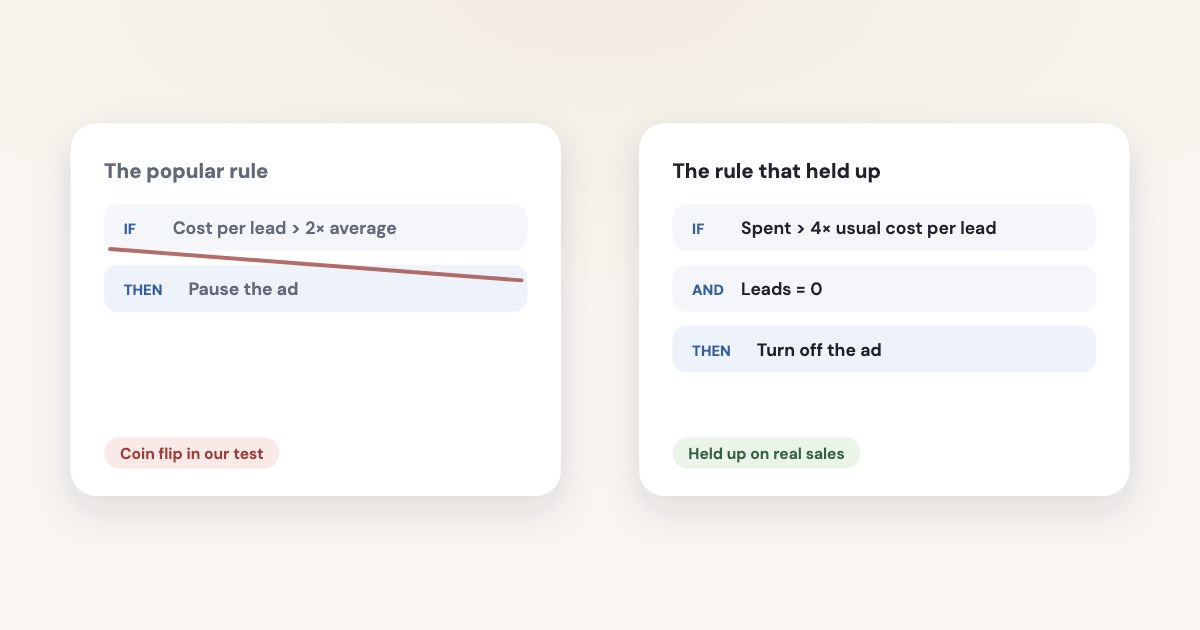
Automated rules in Meta Ads Manager check your campaigns, ad sets or ads on a schedule — at most every 30 minutes — and pause them, change a budget or bid, or notify you when every condition you set is met. For lead campaigns, one rule held up when we tested it on real sales: pause or flag an ad that has spent the price of 4 leads without a single one. The most popular rule, pausing ads whose cost per lead is too high, was a coin flip, and rules based on cost can’t be set at all on campaigns with a campaign budget.
On this page9 sections
How automated rules work
Meta describes them as rules that automatically check your campaigns, ad sets and ads, and then update or notify you of any changes
.
They belong to the ad account: Automated rules apply at the Ad account level, so they work when anyone in your team makes ads.
(source). Create one from All tools → Automated rules to cover everything, or from the Rules button
in the campaigns table for selected items (source).
| What Meta says | |
|---|---|
| Actions | Turn off or on; send a notification only; adjust a daily or lifetime budget; adjust a manual bid; scale a budget or bid (source) |
| Conditions | Several conditions, but only one of each kind, and the rule fires only when all of them are met — there is no “or” (source, limits) |
| Limit | Up to 250 rules per ad account, counting inactive ones; rules can’t run on ads about social issues, elections or politics (source) |
| How often | Every 30 minutes at most: the API’s fastest schedule runs at the start of every half-hour, and a daily rule runs at midnight in the ad account's timezone(source) |
| Attribution | Results are counted with the ad account’s attribution setting; in the API the only allowed value for the attribution_window is ACCOUNT_DEFAULT(source) |
| Notifications | By email and in Ads Manager (source) |
Two details trip people up. Time ranges in rules can include today, a day that isn’t over and whose conversions are still arriving — in
the API, “last 7 days” means Last 6 full days and TODAY
(source). And rules that react within
minutes do exist, but Trigger Based Rules are only available in API at this point, they are not accessible through Ads Manager.
(source).
The trap for lead campaigns: cost rules and campaign budgets
You can’t create rules with cost-related conditions that turn ads or ad sets on or off or send a notification if you’re using campaign budget optimization.
Campaign budget optimisation is what Ads Manager now calls Advantage+ campaign budget, and new lead campaigns start with Advantage+ —
including the budget at campaign level — switched on. So the rule most guides recommend first, “turn off the ad set if cost per lead is
above X”, can’t be created on a campaign set up the default way. The same page warns that Turning off ads or ad sets with cost-related conditions can also retrigger the learning phase.
What you can do instead:
- Use conditions that aren’t about cost — results, impressions, frequency, or spend through the API — like the stop-loss below.
- Move the budget to the ad sets if you need cost rules there.
- Judge an Advantage+ campaign budget at campaign level, as Meta advises, and keep rules on it to notifications — see alerts that only notify.
Which popular rules held up when we tested them
Most rule guides give thresholds without saying whether they were ever checked against money. We back-tested the common recipes on the ad history of one online education business we work with, judging each rule by the revenue the leads later brought from the CRM:
| What happened in our test | |
|---|---|
| Pause ads whose cost per lead is twice the average | A coin flip. Those ads went on to return as much revenue per unit of spend as the rest (2.34 vs 2.35), and 13 of 239 of them became top performers. |
| Pause after spending the price of 2 leads with none | Too early. Ordinary ads hit that state in 13.5% of two-week windows; the ads it paused later paid like everyone else. |
| Pause after spending the price of 4 leads with none | Held up. Ordinary ads reach it in 1.8% of windows; 9 in 10 ads that kept running after it brought no payment in the next four weeks, and none became a top performer (0 of 89). |
| Raise the budget 15–20% after a cheap stretch | Fires at the worst moment: in a small sample, after a week 20% cheaper than the previous four, the next week was dearer 78% of the time even without a raise. |
| Keep raises small to stay safe | Not safer: raises up to +20% and raises of +21–50% both made the next week’s cost per lead worse 67% of the time. |
| Replace creatives when CTR drops | A 30–50% CTR drop on creatives older than 3–4 weeks didn’t predict the next 28 days’ revenue. |
How we tested
Daily ad and ad set data from the ad account, Meta’s change history for budgets, and payments from the CRM, December 2025 – October 2026. Each rule was applied to past data and judged by what the affected ads earned afterwards. Results are proportions from one advertiser that sells through leads; e-commerce accounts weren’t tested.
A starter rule set for a lead campaign
Three rules cover what is worth automating. Start each one with Send notification only for a week, check what it would have done in the Activity history, and only then switch the action on. For where to open that history and how to read its entries, see Facebook ads change history.
1. Stop-loss: spend without leads
- Apply to: all active ads.
- Conditions: amount spent is greater than 4 × your usual cost per lead, and results equal 0.
- Time range: last 14 days; schedule: daily.
- Action: turn off ads — after the notification week.
Use the cost per lead of the whole account, not your target: the rule asks “has this ad had enough money to prove itself?”
One catch: Meta’s list of rule conditions includes results, cost per result, frequency, impressions, reach and hours since creation, but
not amount spent (source). If your rule builder doesn’t offer a spend condition, this stop-loss needs the
Marketing API, whose rules can check spent
(source), or a tool built on it. The closest thing in
Ads Manager is a notification on ads with zero results and enough impressions to have been seen.
2. Cost per lead: notify, don’t pause
- Apply to: ad sets with their own budgets.
- Conditions: cost per result is greater than 1.5 × your usual cost per lead, and results are at least 5.
- Action: send notification only. Then check lead quality in your CRM before touching it: in our test, ads with dearer leads but normal sales paid as well as the rest — see lead quality.
3. Budget: a ceiling, not a ladder
Don’t let a rule raise budgets step by step. If you need one, give it a maximum budget and let it fire at most once a week — in the API,
action_frequency
sets the minimum amount of minutes until the same action can be taken on an object by a rule
, and
Meta’s own example is 10080, a week (source). Without it, a budget rule can fire again every time it is checked.
How to raise a budget by hand: increase a budget without breaking results.
Where rules go wrong
- Too little data. On a small budget, a three-day window holds a handful of leads, and a rule reacts to luck. RocketShip HQ advises:
Always attach a minimum-spend or minimum-conversion floor so the rule only judges ads that have delivered enough to judge.
(source) - Today’s numbers. Windows that include today judge a day that isn’t finished; leads and conversions keep arriving for days.
- Rules that fight. A “scale” rule and a “pause” rule on the same ad set can undo each other. Leave a gap between their thresholds so both can’t be true at once (source).
- Repeats. In the API, the limit on how many times a budget change is applied
defaults to no limit
(source). - Learning. Pausing and budget changes are significant edits; each one can send an ad set back into learning — see learning limited.
- No reasons. A rule sees a number cross a line, not why: a holiday, a broken form or a price change all look the same.
Tools built around rules — Bïrch (formerly Revealbot) checks as often as every 15 minutes and adds “and/or” logic (source), with automated rules in its Pro plan from $99 a month (source) — make rules faster and more flexible, but the thresholds are still yours to choose.
Automated rules vs an AI agent
Meta now uses the word “rules” for a second thing: limits on what an AI agent may do in your ad account through its ads MCP server.
A rule denies a specific agent action on a specific ad account or product catalog — for example, deny any budget increase above 20%, or deny delivery status changes.
(source). The 20% is Meta’s example of a limit you set, not a default.
| Automated rule | AI agent with approval | |
|---|---|---|
| Who acts | Meta, when a threshold is crossed | The agent proposes, you confirm |
| How often | Every 30 minutes at most in Ads Manager | When you ask, or when an alert finds something |
| Context | One ad account’s numbers | Can also read your CRM, lead quality and other ad accounts |
| Explains itself | No — you see what changed in the Activity history | Yes, in plain language before anything changes |
| Good for | Hard limits that must fire at night: stop-loss, budget ceilings | Decisions that need judgment: which ad to pause, where to move budget |
They work best together: rules as a safety net that never sleeps, an assistant for everything that needs a reason. Meta is heading the same
way — it is testing scheduled tasks and alerts
in its own business assistant (source).
How Variafy handles this
Variafy connects ChatGPT, Claude and other assistants to your Meta ad accounts and runs the checks that held up in our tests:
- Every morning it flags ads that spent the price of 4 results without one, and never suggests pausing an ad on cost per lead alone.
- With your CRM connected, it judges ads by qualified leads and sales rather than by Meta’s cost per result.
- Every change — a pause, a budget move — comes as a preview with its effect on spend and runs only after you confirm.
How we checked
Checked on 16 October 2026 against Meta’s Business Help Center pages on automated rules (actions, conditions, limits, creating rules, notifications, rules with cost-related conditions), the Marketing API ad rules engine documentation (schedule, evaluation, execution and trigger-based rules) and the ads MCP server rules documentation. The rule tests are back-tests on the ad and CRM history of one online education business we work with, December 2025 – October 2026; results are given as proportions, judged by the revenue the leads later brought. We also read the rule guides that currently rank for these searches, from Jon Loomer (guide), AnyTrack (rules), RocketShip HQ, Bïrch and others.
Variafy is our product.
Questions
What are automated rules in Facebook Ads Manager?
Rules that check your campaigns, ad sets or ads on a schedule and, when all the conditions you set are met, turn them off or on, change a budget or a manual bid, or send you a notification. They apply to the whole ad account, whoever creates the ads.
How often do Facebook automated rules run?
At most every 30 minutes in Ads Manager; a daily rule runs at midnight in the ad account’s time zone. Rules that react within minutes — trigger-based rules — exist only in the Marketing API.
How many automated rules can I have?
Up to 250 per ad account, and inactive rules count towards the limit.
Why can’t I create a cost per result rule?
Meta doesn’t allow rules with cost-related conditions that turn ads or ad sets on or off, or notify you, when the campaign uses campaign budget optimisation (Advantage+ campaign budget). Use spend and results conditions instead, or move the budget to the ad sets.
What is a good automated rule for lead ads?
A stop-loss: turn off an ad that has spent four times your usual cost per lead without a single lead (a spend condition may need the Marketing API or a tool built on it). In our back-test, ordinary ads reached that state in under 2% of two-week windows, while a two-lead threshold caught them in about one window in seven.
Should a rule pause ads with a high cost per lead?
Not on cost per lead alone. In our test, ads with leads twice as expensive as average went on to return as much revenue as the rest. Let the rule notify you and check lead quality in your CRM first.
Can automated rules increase my budget safely?
Give a budget rule a ceiling and let it act at most once a week. In our data, small raises weren’t safer than larger ones, and raises right after a cheap week were usually followed by a dearer one.