Google Ads audit checklist for a lead business (with AI)
Audit a lead account in this order: conversion tracking first (status, which actions are primary, “One” counting for leads), then where the money goes (search terms, match types, AI Max, location and network settings), then budget and bidding, ads and landing pages, policies, and finally who changed what (auto-applied recommendations, change history, access). Don’t chase the optimization score: Google calls it an estimate of how well the account is set up, and dismissing a recommendation raises it as much as applying one. Several 2026 changes — AI Max on by default, new channel controls, CRM uploads moved to a new API — are missing from most checklists.
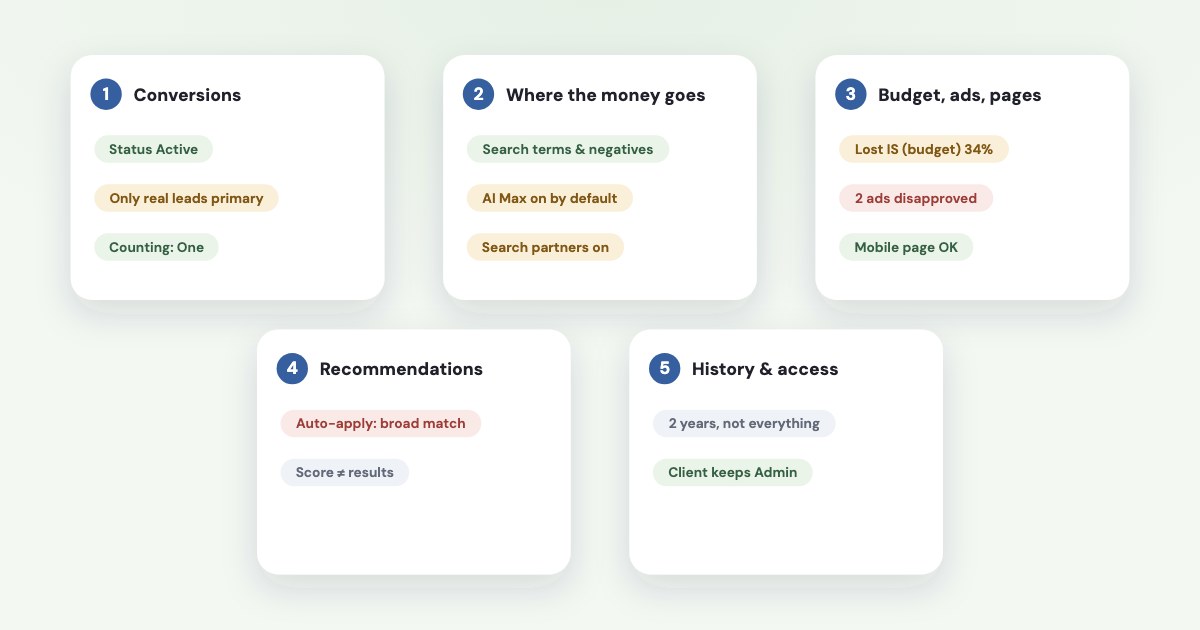
On this page9 sections
1. Conversion tracking
- Status. Goals → Conversions → Summary.
Misconfigured
meansConversions have stopped recording entirely due to a setup error or a broken tag.
; “Awaiting conversions” means none in the last 7 days (source). Hover the status for the reason. For one missing website enquiry, see what to check first when conversion tracking is not working. - Primary vs secondary. Primary actions are
reported in the "Conversions" column in your reports and used for bidding
(source). Keep one or two primary actions that equal a real lead; directions clicks, page views and short calls go to secondary. For counting phone leads, see what counts as a phone lead. - Counting. For leads, use “One”:
Google Ads counts only one conversion per ad click.
Google’s reasoning:usually only one, unique lead per ad click likely adds value for your business
(source). - CRM uploads. If you send qualified leads from a CRM, check they still arrive: from 15 June 2026 offline conversion and enhanced conversions for leads uploads moved to the Data Manager API (source). Choosing a path and diagnosing problems is covered in sending CRM sales back to Google Ads.
2. Where the money goes
- Search terms. Sort by cost, find terms with spend and no leads, add negatives.
Negative keywords won't match to close variants or other expansions.
— add plurals and synonyms yourself (source). - Match types. Broad is the default match type, and
It's critical to use Smart Bidding with broad match.
(source) Our reading: broad match with manual bids is a risk to check; Google recommends Smart Bidding with broad match and does not say broad cannot run with manual bids. The decision and a filled test card are in should you use broad match for lead generation. - AI Max.
New Search campaigns have the AI Max feature turned on by default.
, with text customisation and final URL expansion (source). For a business with one landing page, final URL expansion can send clicks to other pages of the site — check it. - Location option. The default, Presence or Interest, is
This default and recommended option
in Google’s words; switching away usually cuts impressions (source). For a local service that only works in one town, we’d test “Presence” — our advice, not Google’s. A filled service-area card is in checking your Google Ads service area. - Networks.
When you create a campaign for the Search Network, search partners are included by default.
(source) To separate the network from lead quality, see Search partners. Check whether the Display Network box is ticked; older campaigns often have it. From 15 October 2026 Google is rolling out channel prioritisation, whereBy default, all channels are set to High priority.
(source)
3. Budget, ads and landing pages
- Budget. Search lost impression share to budget shows demand you don’t buy; to rank, a quality or bid problem. What to do with a limited campaign is in Google Ads limited by budget — including the August 2026 change for target CPA campaigns. To decide how much to spend before launch, see how much a small business should spend on Google Ads.
- Targets. Compare target CPA with the last 30 days’ actual cost per lead (how).
- Ads. Ad Strength
isn't used to calculate Ad Rank, Quality Score, or auction wins.
(source) Improve it for coverage of your offer, not for the score. - Landing pages. Insights & reports → Landing pages lists each page with its mobile-friendly click rate (source). Open the top pages on a phone: price, proof, a short form. For diagnosing the components, see what to fix first in Quality Score.
- Policies. Disapproved and limited ads, and the 3-appeal limit — see fixing disapproved ads. If a campaign is not spending, there is a focused check in diagnosing zero and low impressions.
4. Recommendations and optimization score
Optimization score is an estimate of how well your Google Ads account is set to perform.
It is calculated from settings and statistics, and Applying or dismissing these recommendations changes the overall optimization score of your account.
(source) Recommendations themselves don’t predict results (source). An Optmyzr study of
17,380 accounts concluded the score is not and should never be a KPI
(source).
Auto-apply. Check Recommendations → Auto-apply settings and the History tab. Auto-apply won't increase your budget
, but it can
add keywords and broad match, expand targeting and the Display Network, and change CPA and ROAS targets (source).
Consultants report lead accounts where auto-applied broad match quietly changed results (example).
5. Change history, access and billing
- Change history
lists the changes made to your account, campaigns, and ad groups
— butData older than 2 years won't be available.
andnot all account-level settings changes or changes made by Google representatives during consultations are listed.
(source) Changes by Google’s systems are labelled as such. The full search and an incident timeline are in what changed before the drop. - Access. Levels are Admin, Standard, Read-only, Billing and Email-only (source). The business should keep admin access to its own account, even when an agency runs it. Remove people who left.
- Billing. Report costs differ from what you pay: invalid-click and overdelivery credits appear in Billing, not in Campaigns (source). The official investigation workflow is in checking invalid clicks before requesting an investigation.
Running the audit with AI
Google has its own assistant inside the account: Ask Advisor. Its limits matter for agencies —
Ask Advisor is in beta, so there may be limitations.
and Ask Advisor isn't available in MCC accounts.
(source) It also looks only at Google Ads. To check which advertiser account, period and coverage an assistant is reading, see proving the first read when connecting Google Ads.
Prompt for an assistant with a connector
“Audit this Google Ads account for a lead business: conversion status and which actions are primary, counting, search terms with spend and no conversions, match types and AI Max settings, location and network options, budget lost impression share, disapproved ads, and what changed in the last 90 days. List problems by money at stake.”
For Meta, the same checklist is in the Facebook ads audit checklist.
A cross-platform audit: Variafy
Variafy offers read-only Google Ads access after your beta invitation. It reads what this checklist needs — conversion actions and their settings, search terms that spend without converting, campaign settings, recommendations (it never applies them), policy issues and change history — so an assistant can run the audit across Google and Meta in one pass. It doesn’t change anything in Google Ads.
How we checked
Checked on 17 October 2026 against Google Ads Help (optimization score, recommendations and auto-apply, change history, conversion status, conversion counting, primary and secondary actions, enhanced conversions for leads, negative keywords, match types, AI Max, location options, search partners, channel prioritisation, Ad Strength, the landing pages report, access levels, cost and billing, Ask Advisor), Optmyzr’s 2024 study of optimization score and a consultant’s 2026 case notes. Google’s help pages show no update dates. We also read the pages that rank for these searches.
Variafy is our product. Google and Google Ads are trademarks of Google LLC; we are not a Google product, partner or representative.
Questions
How do I audit a Google Ads account?
Go in order: conversion tracking (status, primary actions, counting), search terms and negatives, match types and AI Max, location and network settings, budget and bidding, ads and landing pages, policies, then change history, auto-applied recommendations, access and billing.
Does a higher optimization score mean better results?
No. Google describes it as an estimate of how well the account is set up, and dismissing a recommendation raises it as much as applying one. An Optmyzr study of 17,380 accounts concluded it should never be a KPI.
Should I turn off auto-applied recommendations?
Check what is on first. Auto-apply won’t raise your budget, but it can add broad match keywords, expand targeting and the Display Network, and change CPA targets. Many lead advertisers keep it off and review recommendations manually.
What should a lead business count as a conversion in Google Ads?
Only actions that equal a real lead — a submitted form, a qualified call — set as primary, with counting set to “One” per click. Page views, button clicks and directions belong in secondary actions.
Is AI Max on by default in Google Ads?
Yes for new Search campaigns, with text customisation and final URL expansion. Since September 2026 Google has also been upgrading campaigns that used the campaign-level broad match setting. Review it in each Search campaign’s settings.