Instagram account not showing in Facebook ads: fixes
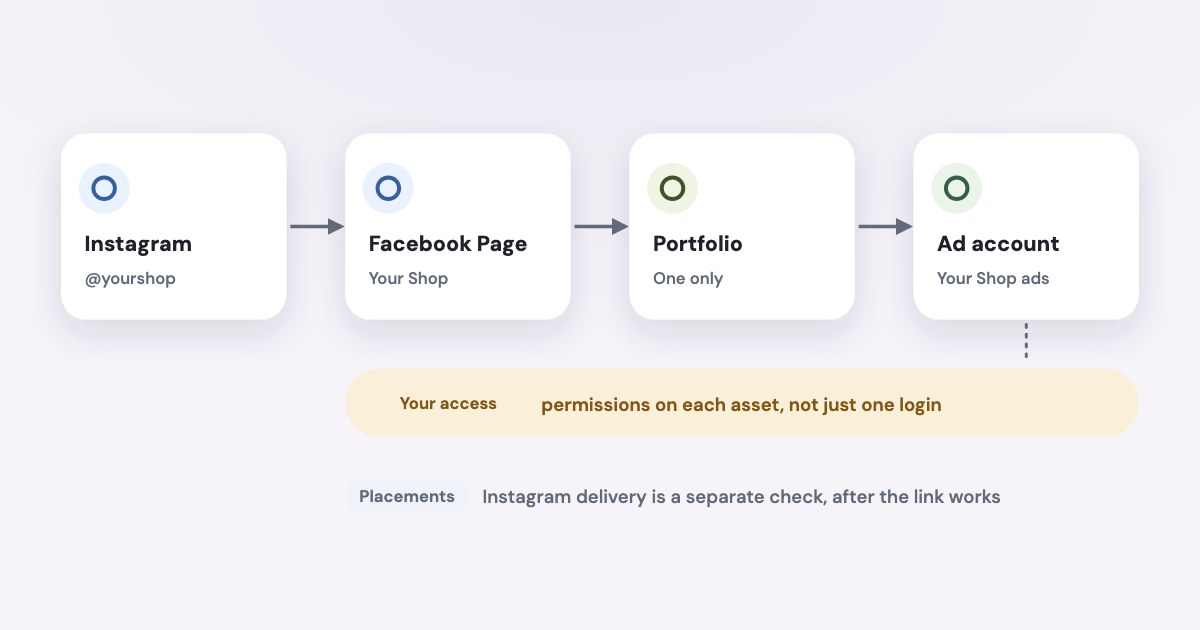
If your Instagram account is not showing in Facebook ads, check the professional account’s Page connection, business portfolio and the access of the person creating the ad. If you can select the account but only see Facebook delivery, investigate placements and creative compatibility separately. Meta supports using either a Facebook Page or a connected Instagram professional account for Instagram ads. [1] [2]
On this page10 sections
Which part of the connection is missing?
Record the intended handle, Page, portfolio and ad account, including IDs where available. Identify the Facebook login creating the ad.
| What you observe | Check next |
|---|---|
| Your Instagram handle is unavailable | Page connection, portfolio and asset access. |
| A colleague sees the handle but you do not | Your individual permissions on the relevant assets. |
| The account can be selected but an Instagram preview fails | The displayed placement or creative warning. |
| The account can be selected but delivery favors Facebook | Eligible placements, account controls and actual reporting. |
As of November 2026, Meta says its business-asset permissions have full access and partial access levels; the general permissions page describes full access as formerly full control. Some task-specific instructions still say full control, so compare the actual permission rather than searching for only an older role name. [4]
For the wider ownership structure, see Meta business portfolio setup.
Is the professional account connected to the right Page?
Meta’s current linking instructions require a professional Instagram account, full control of the Facebook Page and the professional account in the same portfolio as the Page. A personal account may be prompted to switch during the linking process. [3]
Use the Instagram account owner’s login and verify the selected Facebook account. The following English labels were read in Meta’s documentation on November 4, 2026. [3]
- Open the intended Instagram profile.
- Select Edit profile.
- For a business account, find Public business information; for a creator account, find Profile information.
- Tap Page.
- Tap Connect or create.
- Tap Continue.
- Tap Login to Facebook.
- Use Switch Facebook account if the displayed login is wrong.
- Choose the intended Page.
- Tap Connect.
Match the existing connection with the intended ad Page. Check similarly named Pages carefully.
Meta is gradually moving account settings from Accounts Center to Meta Account settings. Seeing a Facebook profile linked in those personal account settings does not establish the professional Page-and-portfolio connection you are checking here. [6]
Is Instagram in the intended business portfolio?
Meta says an Instagram account can be added to only one business portfolio. If it is already in another portfolio, the owning business can give appropriate access, or the account must be removed from that portfolio before being added elsewhere. [2]
For a client account, establish ownership before attempting a move. Inspect existing agency sharing first.
When adding the account to the correct portfolio is the agreed correction, Meta documents these desktop steps, read November 4, 2026. [2]
- Open Settings in Meta Business Suite for the intended portfolio.
- Under Accounts, click Instagram accounts.
- Click Add.
- Review the information shown.
- Click Add Instagram account.
- Enter the intended Instagram account’s login in the new window.
- Click Log in.
- Complete the requested authentication.
- Click Confirm.
Confirm the success message. Meta also requires access to the ad accounts connected to Instagram to use it for advertising. [2]
Keep the owner involved for assets held elsewhere. The agency access guide explains partner handovers.
Does the person creating the ad have access?
Compare your Instagram, Page and ad account permissions with a colleague who can select the handle. Check the intended portfolio.
Meta’s permission model allows partial access for assigned assets and tasks. Portfolio-level access and asset-level access are separate, so inspect the scope that applies to the advertising work. [4]
For someone already in the portfolio, Meta documents this assignment route. The labels below were read November 4, 2026. [5]
- Have the appropriate administrator open Meta Business Suite Settings.
- Click People.
- Click the intended person’s name.
- Click Assign assets.
- Select the relevant asset.
- Select the permissions needed for that person’s work.
- Click Assign assets to grant access.
Inspect the remaining assets, then return to the ad after the correction. Test visibility before changing anything else.
For agencies, check the client-to-partner share and the partner’s staff assignment. Partner permissions limit what staff can receive. [7]
Is a request or restriction blocking the link?
Meta’s current troubleshooting page identifies missing full access, another administrator’s approval, a personal Facebook profile in place of a Page, restrictions and an Instagram profile already held in another portfolio as connection blockers. Read the actual error against that list before attempting another repair. [6]
Another person with full access may need to approve adding the profile in Meta Business Suite Settings > Requests. For a Page connection requiring confirmation, Meta also describes notifying people with full access to confirm in Page settings. These locations were checked November 4, 2026. [6]
Have the administrator address a pending request before starting another. Record the outcome and any error.
For restrictions, Meta directs you to Business Support Home. Use the account or asset issue shown there and follow the account-restriction guide when that is the actual blocker. [6]
For support, collect asset IDs, handle, error and screenshot. Identify whether failure occurs during portfolio adding, Page linking or ad identity selection.
Why are the ads still running only on Facebook?
Once you can select the intended Instagram account, inspect delivery eligibility separately. Meta’s Instagram-ad guide distinguishes choosing placements from completing the ad’s identity, creative and destination, and allows a Facebook Page or connected Instagram professional account to represent the ad. [1]
Check the ad preview and any placement warnings before concluding the profile connection failed. Meta says unsupported media can prevent delivery to a placement and that Ads Manager warnings indicate when different media, aspect ratios or video lengths are needed. [8]
Placement menus are changing
As of November 2026, Meta describes a gradual rollout removing manual ad-set placement selection for Leads, App promotion and Sales. Awareness, Traffic and Engagement retain manual selection; the current instructions also reference Ad creative, Placement value rules and Account controls. Follow the controls available for your objective. [8]
Inspect existing account controls as part of the diagnosis. Meta says account controls apply at ad-account level, so do not change a shared control just to troubleshoot one ad without checking its wider scope. [8]
Advantage+ placements seek efficient opportunities across eligible placements. Your operational check is whether Instagram is eligible and has actually received impressions, not whether spend is divided evenly between platforms. [9]
For interpreting the platform comparison, see Instagram ads versus Facebook ads. If delivery is absent everywhere after approval, use Facebook ads not spending.
What to do next
Verify the intended handle-to-Page connection, portfolio ownership and your own access, then correct the first failed relationship. Return to the affected ad and inspect the selected identity and Instagram preview before publishing any change.
If the identity works but Instagram delivery is absent, check placement eligibility, creative warnings and account controls. Keep the exact error and asset IDs for support if the connection still fails after the documented access and approval checks.
Where Variafy fits
Complete the Instagram connection in Meta first. For reading and comparing your ad data in ChatGPT or Claude afterward, Variafy connects the ad account to your assistant; any account change is previewed and happens only after you confirm. It is in a free beta by invitation, with sign-up closed. Join the waitlist.
How we checked
Checked on 4 November 2026 against the pages below, read in English; Meta’s pages were read in a browser. We checked the documentation only: we did not run these steps in a live ad account.
- www.facebook.com/business/help/1513393428972189 — Instagram ad identity options, placement and ad-detail separation
- www.facebook.com/business/help/620548115562686 — Professional account, one-portfolio rule, add-account procedure and connected ad-account access
- www.facebook.com/business/help/898752960195806 — Professional-account and Page requirements, current Instagram linking labels
- www.facebook.com/business/help/442345745885606 — Full access, formerly full control, partial access and asset versus portfolio permissions
- www.facebook.com/business/help/325571851329683 — Assign assets procedure and required administrator authority
- www.facebook.com/business/help/567938347644871 — Connection blockers, Requests, Page confirmation, restrictions, one-portfolio rule and Accounts Center/Meta Account settings rollout
- www.facebook.com/business/help/1717412048538897 — Partner asset sharing and permission scope
- www.facebook.com/business/help/1546753450586085 — Objective-specific placement rollout, current control labels, account scope and incompatible media warnings
- www.facebook.com/business/help/196554084569964 — Purpose of Advantage+ placements
What we could not confirm
- That connecting Accounts Center alone assigns an Instagram business asset to the intended ad account.
- That the absence of the real Instagram profile prevents every possible Instagram ad; Meta also documents a Facebook Page identity.
- That every campaign still exposes the same manual ad-set placement selector.
- That enabling Instagram eligibility guarantees a fixed share of impressions or spending.
- A universal synchronization delay after linking, a guaranteed error-specific fix or automatic resolution of ownership disputes.
- That we changed ownership, assigned permissions or tested an ad in a live account.
Variafy is our product.
Questions
Why can’t I select my Instagram account in Facebook ads?
Check four things in order: the professional Instagram account is linked to the right Page, the account sits in the intended business portfolio (an Instagram account can belong to only one), you have the needed permissions on the Instagram account, the Page and the ad account, and no pending request is waiting for another administrator in Settings > Requests.
Can I run Instagram ads without a connected Instagram account?
Meta documents that either a Facebook Page or a connected Instagram professional account can represent the ad on Instagram.
Why do my ads run only on Facebook?
Once you can select the account, check eligibility separately: the ad preview, placement warnings for unsupported media, and account controls. Meta is gradually removing manual ad-set placement selection for Leads, App promotion and Sales, so the selector may not exist for your objective.