How to manage many client Facebook ad accounts with Claude or ChatGPT
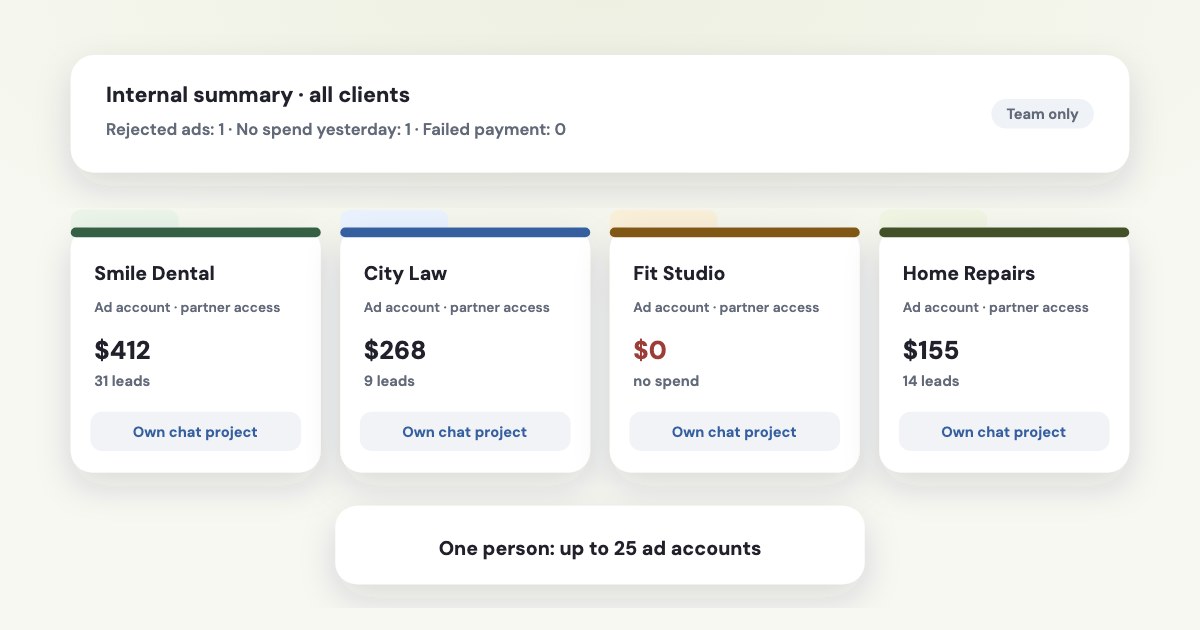
Have each client share their ad account with your business portfolio as a partner, then connect your own Meta login to Claude or ChatGPT through a connector: the assistant sees every client account you were given, with the tasks each client allowed. Name the client in every request, keep one chat project per client so their data doesn’t mix, and approve anything that spends money. Meta’s limits still apply per ad account — 25 people per account, four budget changes an hour per ad set — so an assistant helps you see and explain all accounts at once, not bypass the rules. Skip anti-detect browsers and shared logins: they are the quickest way to get accounts restricted.
On this page9 sections
Step 1: get access the way Meta expects
The client goes to their business portfolio settings → Partners and shares the ad account with yours, or you request it.
To give a partner access to your business portfolio, they must have their own business portfolio.
Access can be full or partial;
partial access to an ad account is split into tasks such as “Manage campaigns” and “View performance” (source).
For a one-off audit, temporary access runs from 3 to 75 days.
Ask for “View performance” if you only report, and “Manage campaigns” if you change campaigns. The connector inherits exactly that. Step-by-step screens are in our guide to agency access.
Not like this
Half the pages that rank for “manage multiple Facebook ad accounts” recommend anti-detect browsers, proxies or logging in as the client. Hiding who controls an account goes against Meta’s account integrity rules and is a common reason for restrictions — the opposite of what an agency needs.
The limits you will meet
| Meta’s limit | What it means for an agency | |
|---|---|---|
| Ad accounts per person | One person can manage up to 25 ad accounts.Closed accounts still count (source) | Spread accounts across team members; Meta doesn’t say how accounts shared with your portfolio as a partner count |
| People per ad account | An ad account can be assigned to up to 25 people. | Rarely a problem; remove people who left |
| New business portfolio | Can create one ad account at first, up to 3 once a campaign delivers and is paid (source) | Let clients own their ad accounts instead of creating them in yours |
| Budget edits | An ad set’s budget can change 4 times per hour(source) | Batch budget decisions; an assistant shouldn’t nudge budgets all day |
| API requests | Counted per ad account, plus app-wide limits on reporting | A report across many clients runs account by account, with pauses |
The last row matters most with an assistant. Meta’s documentation says Rate limiting is at the ad account level
, so one busy
client doesn’t block another — but reporting is also limited across the whole app, so asking for “last month for all 30 clients” at once is
the request most likely to be slowed down (source). A good connector queues it and caches what it already read.
Step 2: tell the assistant which client
When several ad accounts are connected, the assistant has to pick one for every request. Neither Meta, OpenAI nor Anthropic describes how assistants choose, and a guess on the wrong client is the mistake that costs trust. Make it explicit:
- Start with the list. Meta’s own first example request is “List my ad accounts.” Check that every client is there and named the way you call them.
- Name the client in each request: “For Smile Dental: which ad sets got more expensive this week?”
- Before any change, read the account name in the preview. If it’s not the client you meant, cancel.
Questions that should cover everyone — “Which of my clients have rejected ads?” — are fine across all accounts, as long as the answer is for you, not for a client.
Step 3: keep each client’s data apart
Meta’s policy for tools that buy ads on behalf of others is direct:
Keep Meta's data that you maintain on behalf of one advertiser separately from that of other advertisers.
It also says Don't combine multiple end advertisers or their Meta business assets in the same ad account
. Written for apps,
it is a sound rule for any agency using AI, because a chat remembers what it saw:
- One project per client. In ChatGPT, projects with project-only memory mean
Chats cannot reference conversations outside the project
(source). Claude projects keep their own memory too. - Cross-client summaries stay internal. A table of all clients is for your team; a client gets a report about their account only.
- Don’t paste one client’s results into another client’s chat as a benchmark.
From 3 February 2027 Meta’s developer policy also lets an advertiser ask an ad-buying service to disclose its Meta spend separately from its fees, the fee structure and the campaign settings (source). If you resell media through your own tool, plan for it.
Step 4: decide who can change what
Permissions sit in three places, and the strictest one wins:
- Meta — the tasks the client gave your portfolio, and the people in your portfolio you assigned to each account. Meta advises
keeping full control to
ideally 10 or fewer people
and removing people who haven’t logged in for 90 days (source). - The assistant workspace. On Claude Team and Enterprise, owners set each tool to always allow, needs approval or blocked, and
individual users can’t override it (source). On ChatGPT Business,
Only admins and owners can create and publish plugins for custom MCP servers for a Business workspace.
(source) - The connector. Whether changes need a preview and a confirmation, and whether spend increases need a person.
If you build your own app on Meta’s MCP server for client accounts, Meta asks agencies to request Advanced Access to the
ads_mcp_management permission, and lets you set agent controls across many ad accounts at once (source).
A weekly routine that works
- Monday, all clients: “Which accounts spent nothing yesterday, have rejected ads or failed payments?” — one pass, internal only.
- Per client: “Last week against the week before: spend, leads, cost per lead, and what changed.” Then the CRM view if you have it: leads that became sales.
- Write the client report from that answer, in the client’s project (a template).
- Changes go through previews you approve, one client at a time.
- New client: run the audit checklist before touching anything.
How Variafy handles many accounts
Variafy connects your Meta login to ChatGPT, Claude and other assistants and lists every ad account your portfolio owns or was given by clients, with the tasks each one allowed.
- Each request names its account. When several are connected, an operation needs the account, and a confirmed change runs only on the account it was previewed for.
- Some reports cover everyone at once: revenue by account and rejected or limited ads are read account by account and summed up in one answer, each account with its own guard against Meta’s limits and its own cache.
- Briefs by email on a schedule cover every connected account and go only to people with access to it.
Managing many client accounts? Tell us how many accounts you work with in the form.
How we checked
Checked on 17 October 2026 against Meta’s Business Help Center (partner access, ad account limits, business portfolio limits, security recommendations), Meta’s Developer Policies, its April 2026 post on transparency requirements for ad-buying solutions, the Marketing API rate-limiting documentation, Meta’s blog on the ads MCP server, OpenAI’s help pages on projects and MCP apps, and Anthropic’s help pages on connector permissions for Team and Enterprise. We also read the pages that rank for these searches.
Variafy is our product.
Questions
How do I manage multiple client Facebook ad accounts?
Have each client share their ad account with your business portfolio as a partner, assign the accounts to the right people on your team, and work through your own login. Meta allows one person on up to 25 ad accounts. Don’t use client logins, shared passwords or anti-detect browsers.
Can ChatGPT or Claude manage several Meta ad accounts?
Yes, through a connector: the assistant sees every ad account your Meta login has access to. Name the client in every request, check the account in the preview before a change, and keep one chat project per client so their data doesn’t mix.
How many ad accounts can one person manage on Facebook?
Meta says one person can manage up to 25 ad accounts, and an ad account can be assigned to up to 25 people. Closed ad accounts still count toward the limit.
Can I run several clients in one Facebook ad account?
Meta’s Developer Policies for ad-buying tools say not to combine multiple end advertisers in the same ad account. Give each client their own ad account, owned by the client and shared with your agency.
Why is my report across all client accounts slow?
Meta limits API requests per ad account and also limits reporting across the whole app. A report covering many clients has to read them one by one and pause when Meta slows it down, so it takes longer than a single account.