AI agent for Facebook ads: what it is, what it can do and what to keep for yourself
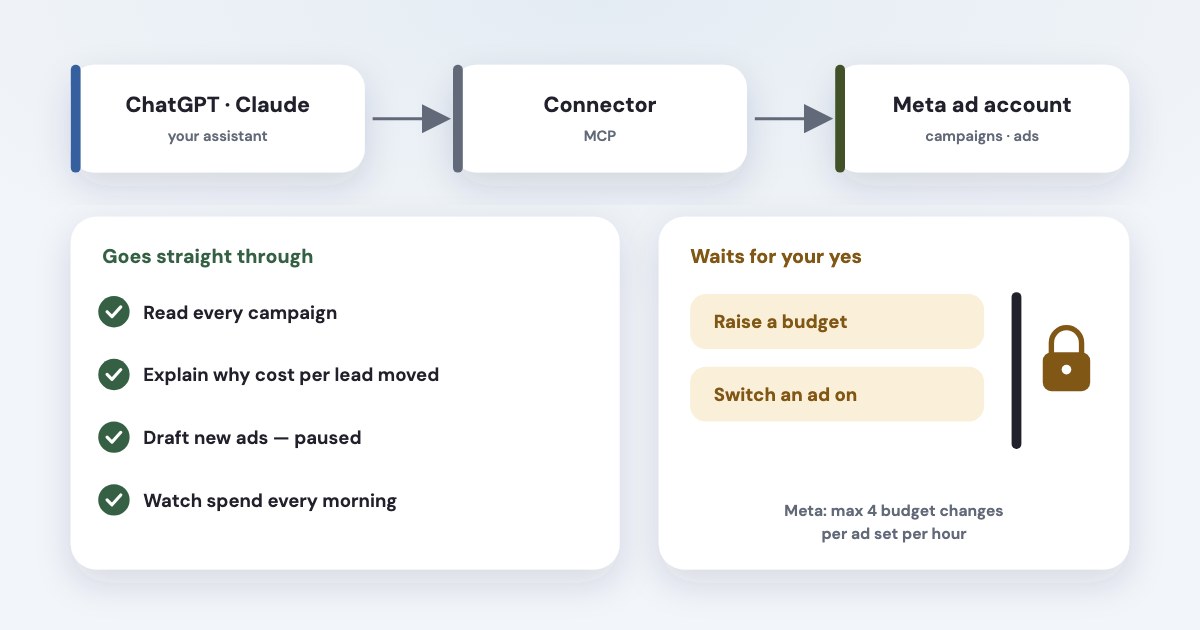
An AI agent for Facebook ads is usually an assistant you already use — ChatGPT or Claude — plus a connector that lets it read and change your Meta ad account. Meta has its own free connector, and third-party ones add their own checks. It is good at reading the account, explaining why results moved, drafting campaigns and watching for problems. Keep decisions that move money — higher budgets, switching ads on — behind your approval; Meta’s own connector creates ads paused for the same reason. Meta also calls two other things “AI” in Ads Manager: its built-in business assistant and Advantage+ automation.
On this page10 sections
Three things called an “AI agent” for Meta ads
Search for an AI agent for Facebook ads and you get three different products under one name:
| What it does | Where it runs | |
|---|---|---|
| Meta AI business assistant | Answers questions about your account, applies recommendations, fixes account problems like spend limits and payment errors | Inside Ads Manager and Business Suite (our guide) |
| Advantage+ | Picks audiences, placements, budgets and creative variations inside one campaign | Settings of each campaign |
| Assistant + connector | Reads every campaign, explains results, drafts and changes campaigns when you ask, runs checks on a schedule | ChatGPT, Claude or another assistant, connected over MCP |
They don’t replace each other. Advantage+ decides who sees an ad; the assistant in Ads Manager helps you inside Meta’s screens; an assistant with a connector works across your whole account — and, if you connect them, your CRM and other ad platforms — in plain language. The rest of this guide is about the third kind.
How an assistant becomes an agent
The link is MCP, the Model Context Protocol: an open-source standard for connecting AI applications to external systems
(source). The assistant decides what to ask for; the connector — an MCP server — calls Meta’s Marketing API and
returns the answer.
The ads MCP server is a Meta-hosted Model Context Protocol server that lets you manage Meta ads directly from an AI agent.
Meta announced its connectors in open beta on 29 April 2026: For MCP, no developer credentials, API setup, or coding required.
(source) Its help page lists ChatGPT, Claude, Claude Code and Perplexity (source),
and Meta is gradually rolling out access to tools
for ad accounts (source), so not every account sees
every tool yet.
Third-party connectors use the same API through their own Meta app and add their own logic on top: alerts, CRM data, approval steps. Setup takes a few minutes — see our guides for ChatGPT and Claude, and which one to pick.
What an agent does well
- Reading and explaining. “Why did cost per lead go up this week?” — it pulls the numbers by campaign, ad set and ad, and splits the change into price of impressions, clicks and conversion (how that works).
- Audits. Tracking, structure, wasted spend and fatigue in one pass instead of an afternoon in Ads Manager (the checklist).
- Drafting. New campaigns, ad sets and texts, built from what worked before. Meta’s connector creates them paused:
All ads are paused by default until you set them live.
(source) - Watching. Claude runs scheduled tasks on all paid plans,
even when your computer is asleep
(source); ChatGPT tasks that would change something pauseuntil you review it
(source). A morning check of spend, leads and rejected ads is the easiest place to start. - Reports. A weekly summary for you or a client, in words rather than columns (example).
What to keep for yourself
An agent works through the same API as any tool, with the same limits and the same lack of an undo button. A change to a running campaign applies at once. Three things deserve a human “yes”:
- Budget changes. Meta allows an ad set’s budget to change
4 times per hour
; past that, the budget is locked for an hour (source). Frequent changes also restart learning, so an agent that “optimises” budgets every hour does harm twice (how to raise a budget safely). - Switching ads on. A new or edited ad goes through review and can reset learning. Drafting is cheap; going live should be your call.
- Pausing on Meta’s numbers alone. In our back-tests, popular rules like “pause ads with twice the average cost per lead” didn’t hold up on real sales (details).
Approval prompts can be switched off
Both assistants let you skip confirmations. Anthropic asks you to
Review Claude's tool approval requests carefully
and warns that Malicious MCP servers may include hidden instructions
(source). The safer setup puts the guard in the connector, not only in the chat: Meta lets the business
owner set rules its MCP server enforces, and advises starting in a read-only or approval-required posture and widen permissions programmatically as confidence grows.
(source)
Will it get your account banned? Meta says it is unlikely that an account would be banned simply for using it
; bans come from
breaking its advertising standards (source). Logging an AI browser into Ads Manager is a different, riskier
thing — see is it safe to let AI change your Facebook ads.
For a business that collects leads
If you run lead forms or a landing page, Meta’s automation is already on: Advantage+ is the default setting in Meta Ads Manager for campaigns using the leads objective
(source). An agent shouldn’t fight it by micro-managing audiences and placements. Its job is what Advantage+
can’t see:
- Which leads become customers. Meta counts form submissions. Connect the CRM and the agent can rank ads by sales, not by cost per lead (why it changes the picture). Meta itself suggests sending CRM stages back through the Conversions API.
- Junk leads. Spotting forms with fake numbers or no answers, and the ads that bring them (lead quality).
- Money with no result. An ad set that spent several times your usual cost per lead with no lead, or ads that stopped delivering.
- Telling you in plain words, before you open Ads Manager.
For agencies
- Use partner access, not client logins. The client shares the ad account with your business portfolio; the agent then sees it through your own login (how to set it up).
- One client per ad account. Meta’s policy for ad-buying tools says:
Don't combine multiple end advertisers or their Meta business assets in the same ad account
(source). - Keep client data apart in the assistant too. A chat project per client means one client’s numbers don’t end up in another client’s report.
- Your own app is a different matter. If you build your own app on Meta’s MCP server for client accounts, Meta asks agencies and
partners to
Request Advanced Access on the ads_mcp_management permission.
— and lets you set agent controls in bulk across many ad accounts (source).
The details — account limits, switching between clients, reports across accounts — are in how to manage many client ad accounts with Claude or ChatGPT.
What Meta announced next
On 6 October 2026 Meta said its assistant will plan and create a campaign, generate creative imagery and text, update targeting, or change a budget conversationally
,
with every action gated behind advertiser-set permissions and explicit approval before anything goes live.
It also said
Agent-staged work now lands as a draft in Ads Manager
(source). Treat the campaign-creation part as
announced, not available everywhere: check your own Ads Manager.
The direction is clear either way — agents prepare, people approve. That is a sensible rule for any agent you connect.
How Variafy works as an agent
Variafy is a connector for ChatGPT, Claude and other assistants, built around the split above:
- Reading data is free — reports, audits, fatigue and wasted-spend checks, revenue by ad when your CRM or a sheet is connected.
- Every change shows a preview first, with its effect on spend, and runs only after you confirm it. New ads are created paused; a higher budget needs a signed-in person. Pausing is always free.
- It watches without being asked: every 15 minutes it checks each connected ad account and emails you when spend stops, a payment fails, ads are rejected or tracking goes quiet — with the fix prepared for your approval.
How we checked
Checked on 17 October 2026 against Meta’s announcements of its ads AI connectors (April 2026) and Advertising Week (October 2026), its developer documentation and blog on the ads MCP server, the Business Help Center page on the connector, the Advantage+ leads page, Meta’s Marketing API rate limits and Developer Policies, the Model Context Protocol documentation, and the help centres of Anthropic and OpenAI on tool approvals and scheduled tasks. We also read the pages that rank for these searches; we don’t compare products here.
Variafy is our product.
Questions
What is an AI agent for Facebook ads?
Usually an assistant such as ChatGPT or Claude connected to your Meta ad account through an MCP connector, so it can read results, explain them, draft campaigns and make changes you approve. Meta also calls its Ads Manager business assistant and Advantage+ automation “AI”, but they work inside Meta’s own screens and campaign settings.
Does Meta have an official AI agent for ads?
Meta has two: the Meta AI business assistant inside Ads Manager, and a free ads MCP server that connects ChatGPT, Claude, Claude Code and Perplexity to your ad account. In October 2026 Meta announced that its assistant will also create campaigns and change budgets in the chat, with your approval.
Can an AI agent run my Facebook ads on its own?
Technically it can change campaigns through the API, but Meta’s own connector creates ads paused and requires your authorization, and Meta limits budget changes to four an hour per ad set. Let an agent read, explain, draft and alert; approve budget increases and new ads yourself.
Is it safe to connect an AI agent to my Meta ad account?
Meta says it is unlikely an account would be banned simply for using its ads MCP server; bans come from breaking its advertising standards. Use a connector rather than an AI browser logged into Ads Manager, keep approvals on for changes that spend money, and only add connectors you trust.
What is the best AI agent for a business that collects leads?
One that can see your CRM as well as Meta. Advantage+ already handles audiences and placements for lead campaigns; the useful extra is ranking ads by the leads that became customers, spotting junk leads and catching spend with no leads.