Ten client ad accounts: a weekly agency routine
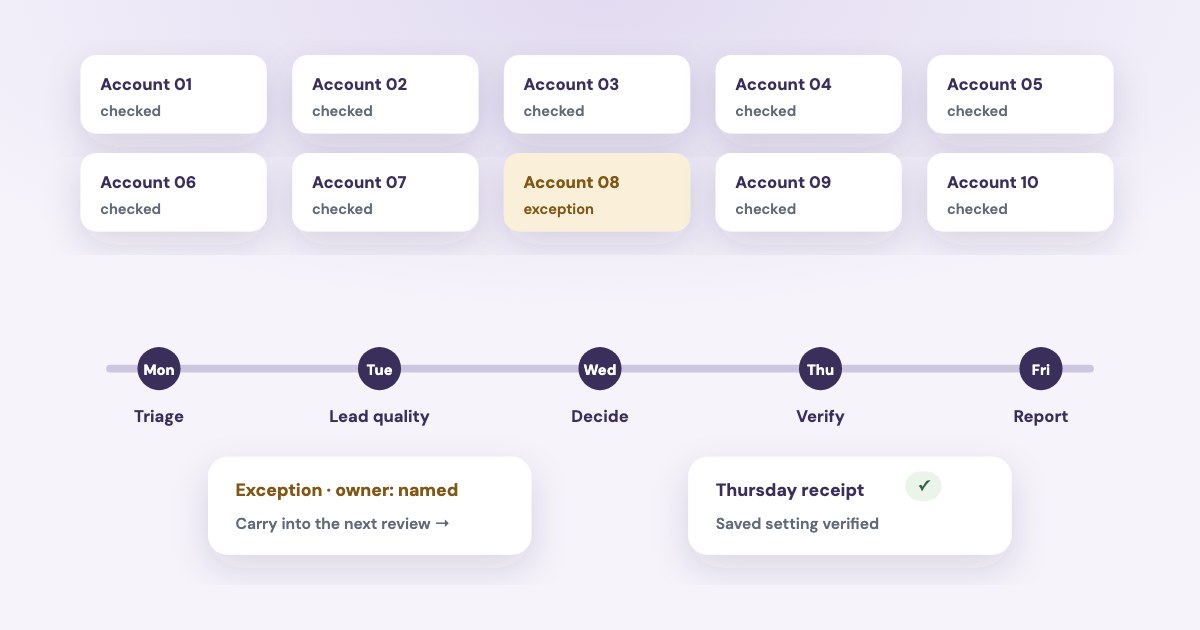
For ten or more client ad accounts, use one account register, a brief daily exception check and a weekly review with a clear owner for every action. Separate diagnosis, client approval and execution so an observation in one account cannot become an unexplained change in another. The routine below adds a day-by-day operating schedule to the separate guides on agency access, client reports and AI account management.
On this page9 sections
Keep one register for all client accounts
Use a row per ad account, including multiple accounts for the same client. Record the client, owning business, account ID, currency, time zone, operator, backup operator, billing contact and agreed media allowance.
Add the reporting cutoff and the location of the client’s lead-quality record. A portfolio of ten accounts needs a consistent way to identify which account, period and outcome each number describes.
| Register field | Example entry | Why it belongs in the register |
|---|---|---|
| Identity | Client A / account ID / client-owned business portfolio | Prevents a similar name being treated as the same account |
| Scope | Account currency, time zone and reporting dates | Makes spend and results interpretable |
| Responsibility | Operator, backup and client approver | Assigns an action when the main operator is unavailable |
| Commercial limit | Agreed media allowance and remaining commitments | Separates the client agreement from platform budget settings |
| Lead outcomes | CRM owner and qualification definition | Connects ad reporting to the client’s business result |
The register stores references and responsibilities rather than passwords or payment credentials. Keep each client’s underlying records in the workspace intended for that client.
Check access once, then use names consistently
Meta documents sharing business assets with a partner using its business portfolio ID and assigning access to specific assets and tasks. Use that partner workflow and the detailed agency-access guide, rather than repeating the setup here.
Use a readable naming scheme alongside the immutable account and campaign IDs. A suggested campaign name is ClientA | US | Leads | Quote | 2026-10; an ad set name can describe the serviceable market and conversion location.
Put the offer or concept and version in the ad name, such as Factory sample | Video | v02. This is our proposed convention, not a Meta standard; avoid including personal lead details in asset names.
At onboarding and staff changes, confirm the relevant assets, assigned operator and lead-retrieval access. A person being able to view reports does not establish that the whole enquiry-handling workflow works.
A weekly routine by day
| Day | Primary review | Output and owner |
|---|---|---|
| Monday | Review every account for access, billing, delivery, spend pace and unresolved incidents | Operator records exceptions; backup checks any account with no current data |
| Tuesday | Review lead quality, contact status, quotes and sales with the client’s agreed cutoff | Operator and sales contact identify the failed funnel step |
| Wednesday | Prioritize proposed changes and check recent significant edits | Operator writes the reason; named client approver accepts spending changes |
| Thursday | Execute authorized changes in the named account and verify the saved settings | Executing operator records IDs, before/after settings and verification |
| Friday | Send the agreed client report and close or carry forward actions | Account owner records the report cutoff, next action and responsible person |
This is a suggested allocation of review work, not a requirement to wait until a particular weekday to fix a problem. An incorrect destination, unexpected spend, lost access or failed enquiry route should enter the exception process when discovered.
Daily checks support the weekly review
At the start of each working day, scan the account register for new payment, access and delivery exceptions and confirm that yesterday’s urgent actions were resolved. Agree separately who handles incidents outside working hours; the weekly table does not provide continuous monitoring.
Use an exception queue with evidence
Every exception needs an account ID, observation time, affected period, evidence, owner and next action. Record whether the problem is confirmed, still being diagnosed or waiting for the client.
| Exception | First investigation | Record before acting |
|---|---|---|
| Spend stops unexpectedly | Check delivery, payment, schedule and account status | Exact error and affected assets |
| Spend pace exceeds the client plan | Check budget changes, active dates and remaining commitments | Current settings and the agreed allowance |
| Lead volume rises, quality falls | Check the cohort, qualification definition and offer | Submission count, qualified count and unresolved leads |
| A setting changed unexpectedly | Read activity history and verify permissions | Object ID, change time and reported actor |
Meta’s failed-payment guide distinguishes a balance due from insufficient available funds and other failures. Route an unresolved billing action to the client’s named billing owner rather than repeatedly editing campaigns.
Use the audit checklist for a full diagnosis. The queue’s purpose is to make ownership and follow-through visible across accounts.
Make the change window auditable
you can see who made changes, what changes were made and when those changes were made.
Meta’s activity history is useful evidence of a change; it does not by itself prove that the change caused later performance. Keep the original hypothesis and the relevant reporting period alongside it.
- Name the account and object. Copy the account ID and campaign, ad set or ad ID from the register and the selected asset.
- Write the reason and expected effect. Separate a broken setup from a performance hypothesis, and record the current setting.
- Check context. Review recent significant edits, current budget and the available lead-quality evidence.
- Obtain the required client authorization. Record the exact spending or scope change under the agency’s agreement.
- Execute and verify. Read the saved setting in the intended account, then record the result and follow-up date.
A fixed Thursday window is a planning aid, not evidence that a weekly edit is needed. If no change has a clear reason, keep the observation and next review date without manufacturing an optimization task.
Close the reporting loop on Friday
Use the existing client-report guide for the report structure and metric definitions. Add the operational record that a metric report alone misses: changes approved, changes verified, unresolved exceptions and next owners.
For an illustrative $400 monthly media allowance, a Friday record could say: “$210 spent to the stated cutoff; eight submissions, three qualified, five unresolved; qualification rules unchanged; one quote pending.” Those are fictional figures demonstrating the distinction between known outcomes and work still open.
Do not imply that the full remaining $190 is available for a new experiment without checking active campaign commitments and the remaining dates. Keep each client’s account currency and period explicit when summarizing multiple accounts.
Carry each unresolved item into next week with an owner and decision date. A client report that mentions a payment failure but assigns no next action leaves the operational problem open.
Use an assistant for a bounded account review
For the broader assistant workflow, use managing client Meta accounts with AI and the multi-platform agency guide. A useful request names one client, one account ID, one period and the missing evidence.
For this account ID and reporting period, summarize spend, reported leads and delivery exceptions. Keep missing data and pending CRM outcomes visible. Propose actions with an owner and reason; return each account separately.
Variafy’s Meta integration is in testing and under Meta app review, with access by manual tester invitation. Join the waitlist and describe the agency’s requirements; support for connecting ten external or client accounts is not guaranteed.
How we checked
Meta Help Center sources read in Chrome on 30 October 2026: partner access, activity history, significant edits and failed payments. The linked access, reporting and AI guides provide the adjacent workflows.
Not confirmed: a universal number of accounts per operator, a guaranteed time saving, performance improvement from a weekly routine or product eligibility for ten client accounts. The schedule, register, naming convention and dollar example are editorial proposals, not agency test results. Variafy is our product.
Questions
How can one agency manage ten Facebook ad accounts each week?
Use a register, a short daily exception review and assigned weekly review windows. Workload still depends on campaign complexity, lead volume, reporting obligations and the support the clients need.
Should every account receive a change every week?
No. A review can conclude that no edit has enough evidence. Record the observation and next review date rather than changing a working campaign to fill a schedule.
Is the naming convention required by Meta?
No. It is an editorial suggestion for agency organization. Use account and object IDs to identify the assets even when readable names change.
Can an agency connect ten client accounts to the Meta beta?
That is not guaranteed. The Meta integration is in testing and under app review, with manual tester invitations. Describe your account needs through the waitlist.